Ali
← Back to work
SaaSProduct Strategy0→1Legal & HR

I led the redesign that unlocked Business Kitz's £3M raise

A stalling legaltech product had lost investors. I owned the platform redesign end to end, made the call to ship it in phases to rebuild confidence early, and it helped secure a £3M raise while growing active users from 150 to 1,000+.

Problem
A 2021 legaltech product had stalled. Poor UX broke trust with law firms and clients, and investors had pulled back their backing.
Role
Lead Product Designer. I drove direction across the CEO, CPO, sales and investors, and owned every design decision.
What I did
I set the strategy, made the call to ship in phases to de-risk the rebuild, and connected user needs to the commercial case.
Outcome
Helped unlock a £3M raise and grew active users from 150 to 1,000+.
Client
Business Kitz
Role
Lead Product Designer
Timeline
2025
Outcome
£3M raised · 150 → 1,000+ users
I led the redesign that unlocked Business Kitz's £3M raise

Overview

Business Kitz works with some of the biggest law firms and listed companies in Australia and the UK, so the product knows the agreements, policies and systems that large businesses need to run.

The first version launched in 2021 and hadn't been touched since. It was built to help lawyers and HR managers write policies and agreements and to keep all those documents in one place. The problem was that the experience hadn't kept up with what the business or its users needed.

I led the redesign from start to finish. My job wasn't just to make the screens look better. It was to bring together three things, what users needed, what made sense for the product, and what the business needed commercially, and use design to connect them. That meant working with the CEO and CPO on direction, with clients and the sales team on what was breaking trust, and with investors who needed to see the product was worth backing again.

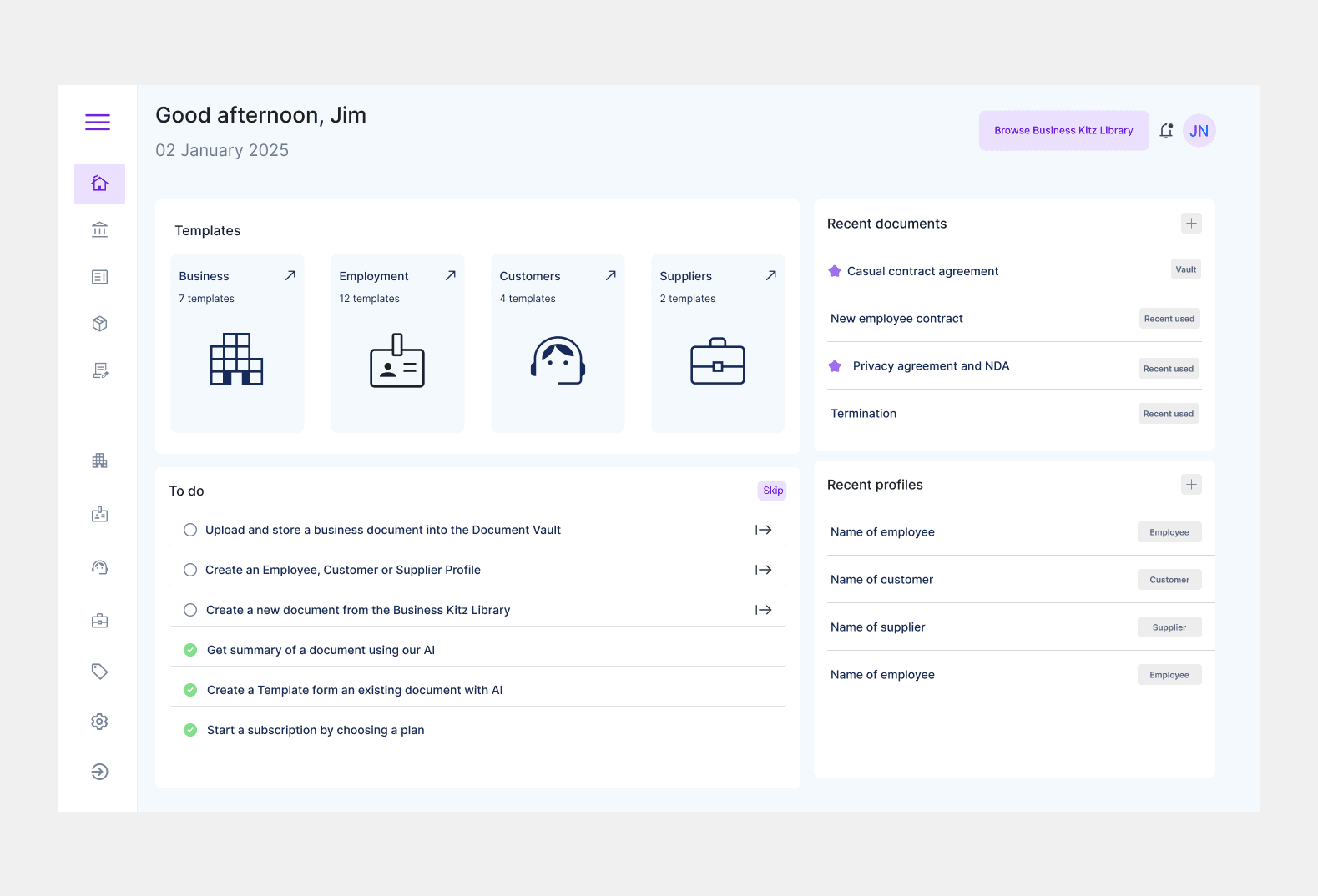
The redesigned Business Kitz homepage
The redesigned platform that won back client and investor trust.

The problem

Over the previous two years, Business Kitz had lost the trust of law firms and clients. The old design and limited features made everyday tasks slow and frustrating, and that had a real cost: investors pulled back, which put the company's future at risk.

The homepage showed the problem clearly. Users told us it was confusing, didn't make it clear what to do next, and didn't point them to the parts of the platform they actually used. Many had stopped using it at all.

I treated this as both a product problem and a business problem. Every usability win had to turn into something the CEO, CPO and investors could feel: faster tasks, more confidence from clients, and a strong story for the next round of funding.

The old Business Kitz homepage before the redesign
The original homepage: confusing, with little to guide users.

The call I made: phased, not big-bang

There was pressure to rebuild the whole platform in one go and relaunch it as a single statement to investors. I pushed back. A big-bang rewrite would have taken months with nothing to show, and with investor confidence already thin, that was the riskiest path we could take.

I made the call to ship the redesign in three phases instead, each one a high-impact area we could put in front of investors and clients while the rest was still in progress: the homepage, the document library, then the profile pages. It let us prove value early, keep developers shipping continuously, and turn each release into evidence for the raise rather than betting everything on one launch.

I anchored the plan in three principles I held the team to: move fast and show value early to win back investor confidence, design with developers so the work actually shipped, and fix the real UX rather than reskinning screens. Research backed every decision. I tested with 6 users, interviewed an investor who also ran her own consultancy on the product, and spoke with the sales rep so the redesign worked for users, the business, and the people selling it.

Phase 1: the homepage

The homepage was the way in, so it went first. The research told a clear and consistent story. The investor felt the UI was old and that the homepage and nav bar did the same job, just pointing elsewhere, with nothing you could actually act on. The 6 users were frustrated by how many clicks it took to reach templates and files, and some found features they never knew existed. The sales rep kept hearing the same complaints from clients.

From this I set clear goals: rework the layout and navigation, bring more profiles and documents onto the homepage so users could actually do things from it, and give the whole thing a UI refresh built on shared components. We then ran a few rounds of ideas, voting and talking them through with users until we had two sketches, which we tested with both users and the investor.

The result was a homepage built around getting things done: templates, recent documents, recent profiles and a simple to-do list that tells users exactly what to do next.

Old homepage
Before: the original homepage.
Homepage user research from the investor, users, sales rep and objectives
Bringing together the investor, users and sales rep, then turning it into goals.
The two homepage sketches tested with users and the investor
The two directions we tested before converging.
Final redesigned homepage
After: an action-led homepage that guides users to their next step.

Phase 2: document library

The document library was where the real work happened, and it was painful to use. The investor said it took ages to move from one document or template to another, and that splitting templates by country got in the way rather than helping. Five of the six users wanted to see their documents straight away, and again pointed out that the UI had no clear order to it.

I set goals around bringing the Business Kitz library and the client's own library into one view, showing as many documents as possible, and matching the wider UI refresh. I mapped a user flow for creating, editing and managing documents, including the path to make a new document from either the BK library or the user's own, then worked it down to two options and tested them.

The new library puts documents and templates side by side, shows the details and actions for each one, and gets rid of the dead ends users kept running into.

Old document library
Before: folders split by country that slowed everyone down.
Document library user research and objectives
Research and objectives for the library.
Document library wireframe combining BK and own libraries
Wireframing one combined library view.
User flow for creating, editing and managing documents
The document creation and management flow.
Final document library design
After: documents, templates, details and actions in one place.

Phase 3: profiles

The last phase was the profile pages. I'll show the Employee profile here, since the customer and supplier profiles use the same design and flow.

Users found it hard to edit information or add documents and templates to a profile, and some couldn't upload contacts in the first couple of clicks. The investor wanted to look through details without being forced through everything else, and the sales rep said people were confused about which fields were required.

The goal was one profile that links cleanly to documents, contacts and details, with much easier editing. I mapped the profile flow (Details, Documents, Contacts and Notes) and designed one profile that brings employment, qualifications, emergency contacts and linked documents together in a single, easy-to-edit view.

Old employee profile
Before: editing and uploads buried and confusing.
Profile user research and objectives
Research and objectives for profiles.
Two profile layout wireframes
Testing two profile layouts.
Profile user flow across details, documents, contacts and notes
The profile flow: details, documents, contacts and notes.
Final employee profile design
After: one unified, editable profile.

The impact

£3M+ raised and active users grown from 150 to 1,000+. After the phased launch, Business Kitz closed a raise of over £3 million and grew from 150 to more than 1,000 active users, a jump in usage and, just as importantly, in investor confidence.

The redesign was central to that raise: it gave the business a real, working product to put in front of investors and clients, and I presented the new designs to both directly. Users reported it was far easier to create and manage documents, and because I designed in step with engineering, the work shipped without stalling.

In a related project I added generative AI to the policy and agreement creation flow, which sharpened how I design guided, conversational interactions.

How I worked, and what I set in place

This was the project where I moved from redesigning screens to leading: setting product direction, making the commercial case, and holding a line on what mattered. The three principles I set at the start, ship value early, design with engineering, fix real UX, became the shared language the team used to make trade-offs, not just my private checklist.

Working across the CEO, CPO, sales, clients and investors, I learned to frame the same design decision in the terms each of them cared about, commercial upside for the board, trust for clients, feasibility for engineering, while keeping the user at the centre. Standing up for users was never separate from the business goal: the clearer, faster journeys were exactly what won back client trust and helped secure the funding.